Usage
VectorBT allows you to easily backtest strategies with a couple of lines of Python code.
Examples
Run a backtest with local prices
Start with a small price series to try the core package without downloading data or installing a market-data integration:
import pandas as pd
import vectorbt as vbt
close = pd.Series(
    [100.0, 102.0, 101.0, 104.0, 103.0, 107.0],
    index=pd.date_range("2024-01-01", periods=6, freq="D"),
    name="Close",
)
pf = vbt.Portfolio.from_holding(
    close, init_cash=1000, fees=0.001, freq="1D"
)
print(round(float(pf.total_return()) * 100, 2))
Output:
6.89
This invests the available cash at the first price, including a 0.1% entry fee. The position remains open: the final portfolio value uses the last price, without charging a hypothetical exit fee. freq="1D" tells the statistics engine that each observation represents one day; it does not resample the prices.
Inspect pf.orders.records_readable for fills or pf.stats() for a summary. For multiple strategies and signal timing, continue with vectorized backtesting.
The market-data examples below use the optional Yahoo Finance integration. Install it with pip install yfinance or install all integrations with pip install "vectorbt[full]". Downloaded data and the resulting output can change as providers update their history.
Invest $100 in Bitcoin since 2014
import vectorbt as vbt
data = vbt.YFData.download("BTC-USD")
price = data.get("Close")
pf = vbt.Portfolio.from_holding(price, init_cash=100)
print(pf.total_profit())
Output:
19501.10906763755
Trade a dual-SMA crossover strategy
fast_ma = vbt.MA.run(price, 10)
slow_ma = vbt.MA.run(price, 50)
entries = fast_ma.ma_crossed_above(slow_ma)
exits = fast_ma.ma_crossed_below(slow_ma)
pf = vbt.Portfolio.from_signals(price, entries, exits, init_cash=100)
print(pf.total_profit())
Output:
34417.80960086067
VectorBT PRO
Simulate limit orders, use leverage, and model futures with contract multipliers.
Generate 1,000 random strategies
import numpy as np
symbols = ["BTC-USD", "ETH-USD"]
data = vbt.YFData.download(symbols, missing_index="drop")
price = data.get("Close")
n = np.random.randint(10, 101, size=1000).tolist()
pf = vbt.Portfolio.from_random_signals(price, n=n, init_cash=100, seed=42)
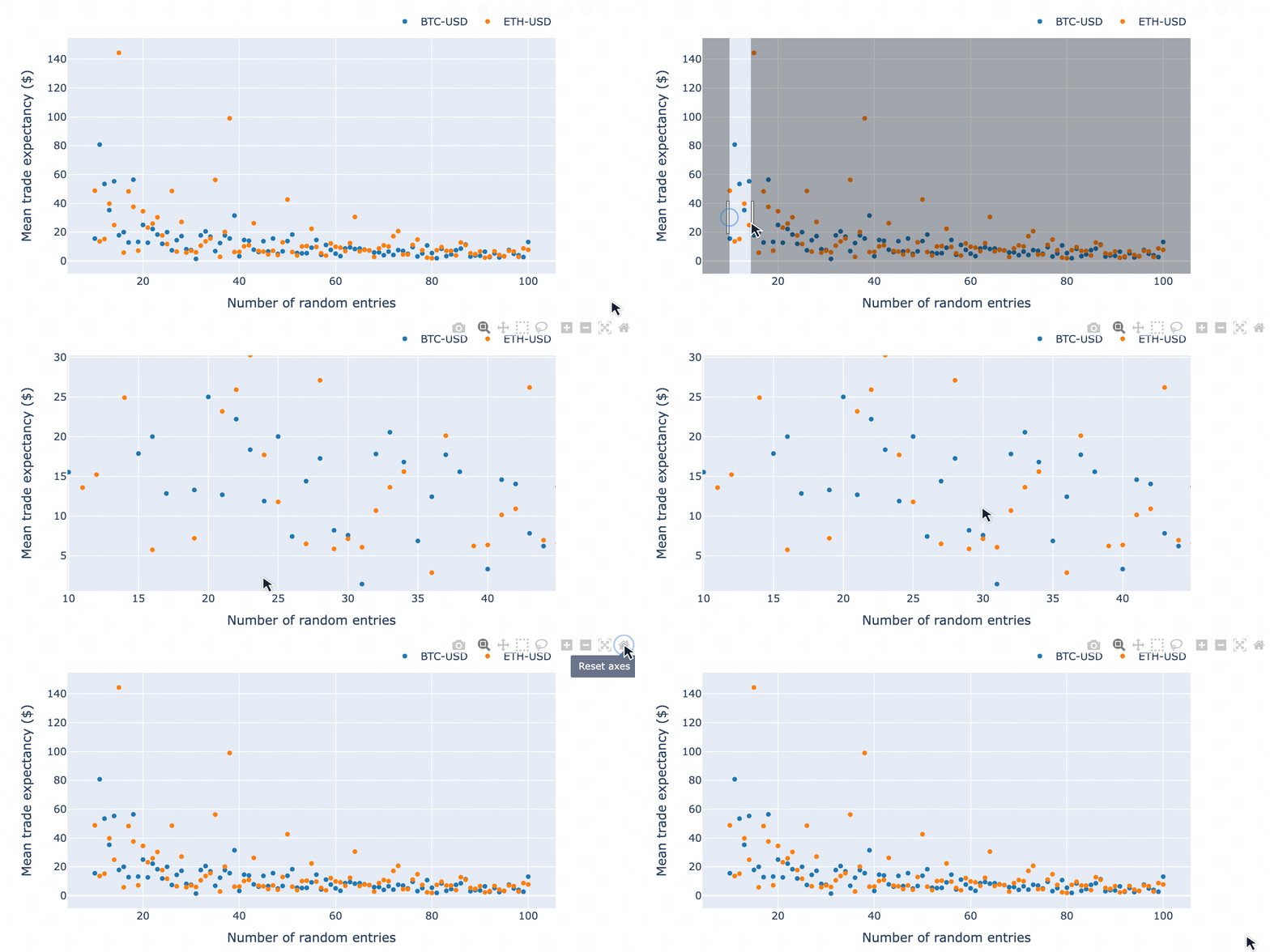
mean_expectancy = pf.trades.expectancy().groupby(["randnx_n", "symbol"]).mean()
fig = mean_expectancy.unstack().vbt.scatterplot(xaxis_title="randnx_n", yaxis_title="mean_expectancy")
fig.show()
Output:
Test 10,000 dual-SMA window combinations
symbols = ["BTC-USD", "ETH-USD", "XRP-USD"]
data = vbt.YFData.download(symbols, missing_index="drop")
price = data.get("Close")
windows = np.arange(2, 101)
fast_ma, slow_ma = vbt.MA.run_combs(price, window=windows, r=2, short_names=["fast", "slow"])
entries = fast_ma.ma_crossed_above(slow_ma)
exits = fast_ma.ma_crossed_below(slow_ma)
pf = vbt.Portfolio.from_signals(price, entries, exits, size=np.inf, fees=0.001, freq="1D")
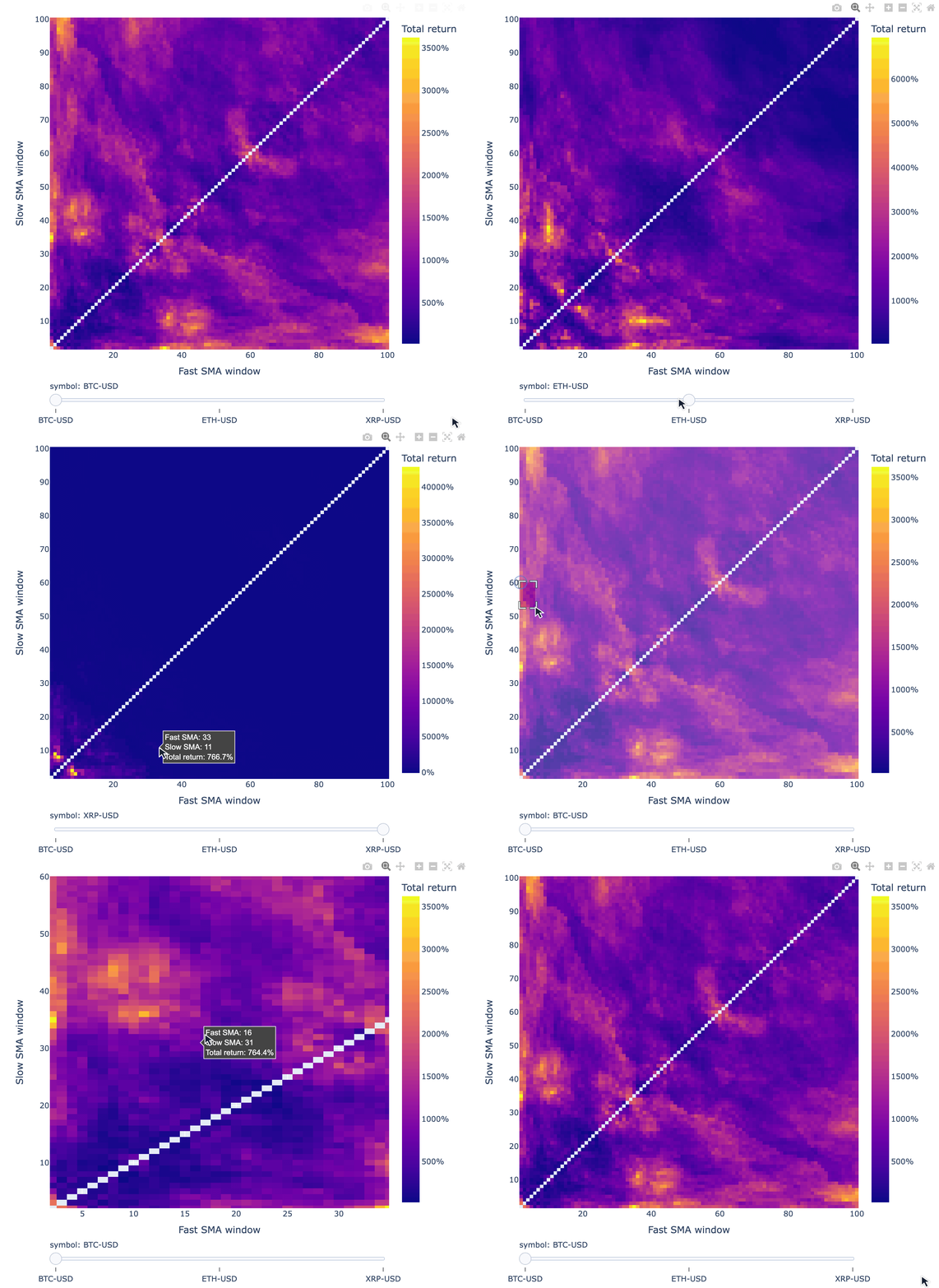
fig = pf.total_return().vbt.heatmap(
    x_level="fast_window", y_level="slow_window", slider_level="symbol", symmetric=True,
    trace_kwargs=dict(colorbar=dict(title="Total return", tickformat="%")))
fig.show()
Output:
VectorBT PRO
Use random search to sample a large parameter grid, or conditional parameters to exclude combinations such as a fast MA window longer than the slow MA window. The cross-validation tutorial shows how to select parameters on training data and evaluate them on later periods.
Inspect any strategy configuration
Digging into each strategy configuration is as simple as indexing with pandas:
print(pf[(10, 20, "ETH-USD")].stats())
Output:
Start                          2017-11-09 00:00:00+00:00
End                            2026-01-03 00:00:00+00:00
Period                                2978 days 00:00:00
Start Value                                        100.0
End Value                                    1604.093789
Total Return [%]                             1504.093789
Benchmark Return [%]                          866.094127
Max Gross Exposure [%]                             100.0
Total Fees Paid                               204.226289
Max Drawdown [%]                               70.734951
Max Drawdown Duration                 1095 days 00:00:00
Total Trades                                          81
Total Closed Trades                                   80
Total Open Trades                                      1
Open Trade PnL                                -14.232533
Win Rate [%]                                       41.25
Best Trade [%]                                120.511071
Worst Trade [%]                               -27.772271
Avg Winning Trade [%]                          27.265519
Avg Losing Trade [%]                           -9.022864
Avg Winning Trade Duration    32 days 20:21:49.090909091
Avg Losing Trade Duration      8 days 16:51:03.829787234
Profit Factor                                   1.275515
Expectancy                                     18.979079
Sharpe Ratio                                    0.861945
Calmar Ratio                                    0.572758
Omega Ratio                                      1.20277
Sortino Ratio                                   1.301377
Name: (10, 20, ETH-USD), dtype: object
Plot any strategy configuration
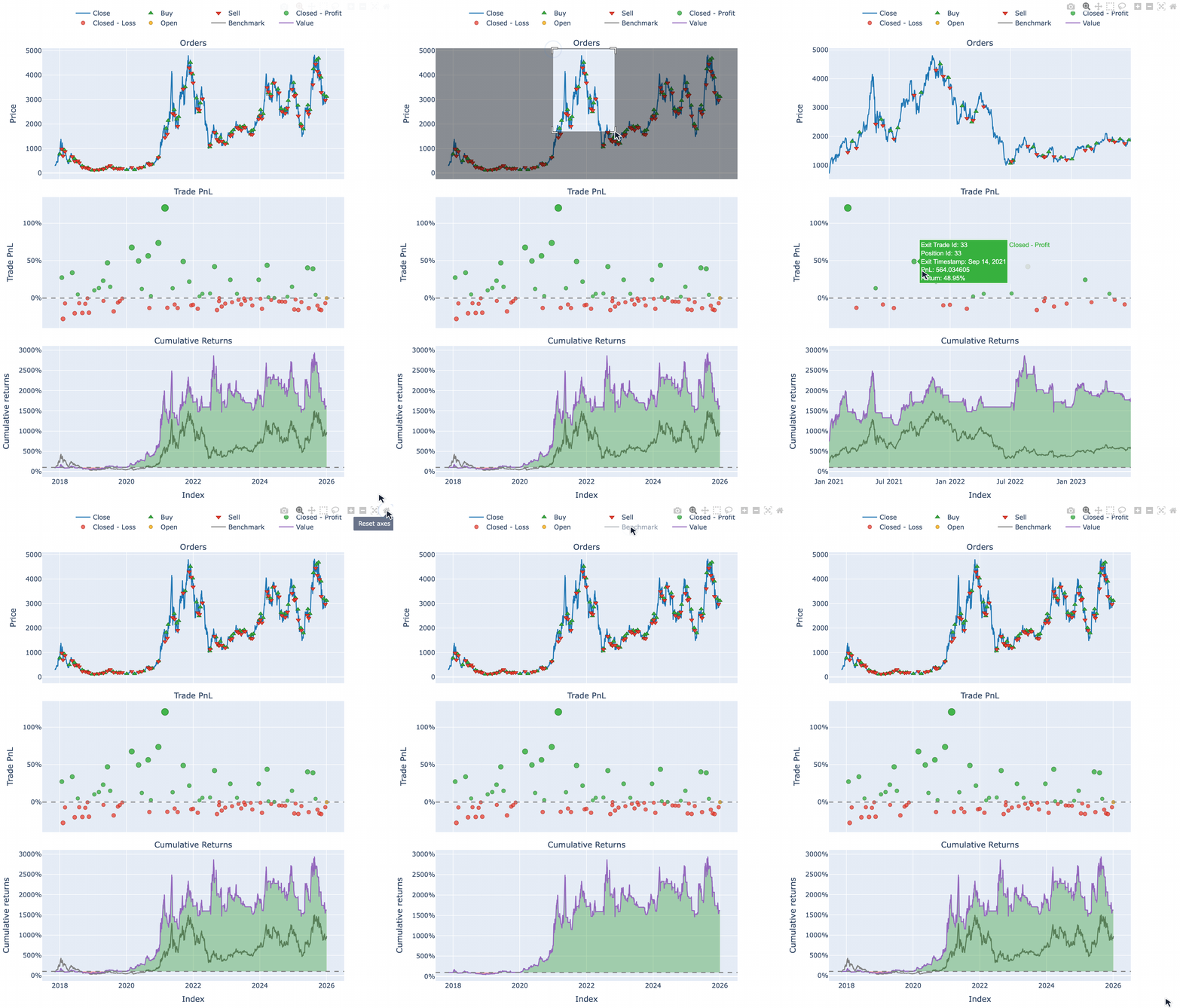
pf[(10, 20, "ETH-USD")].plot().show()
Output:
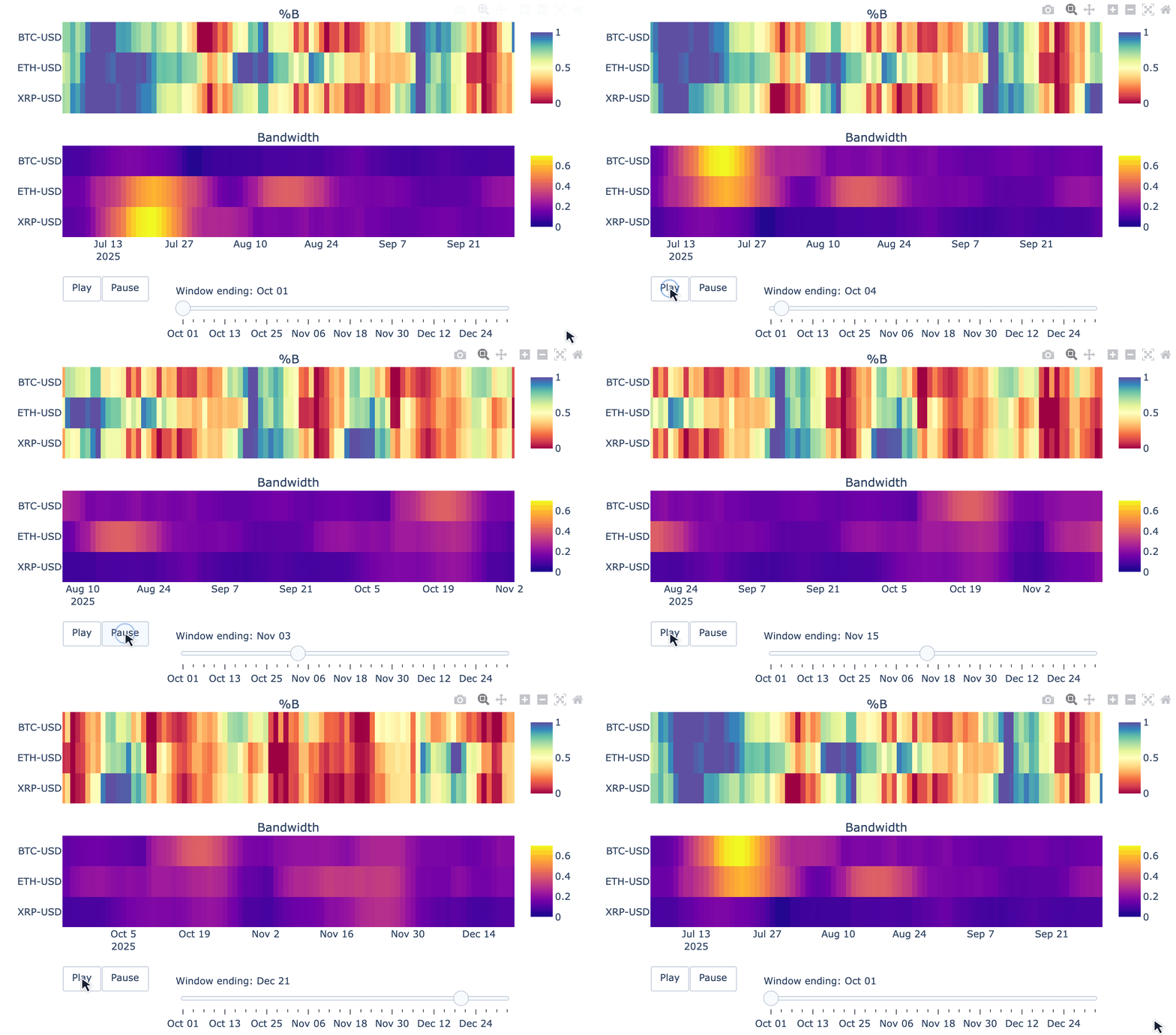
Animate Bollinger Bands across multiple symbols
VectorBT goes beyond backtesting, with tools for financial data analysis and visualization:
symbols = ["BTC-USD", "ETH-USD", "XRP-USD"]
data = vbt.YFData.download(symbols, period="6mo", missing_index="drop")
price = data.get("Close")
bbands = vbt.BBANDS.run(price)
def plot(index, bbands):
    bbands = bbands.loc[index]
    fig = vbt.make_subplots(
        rows=2, cols=1, shared_xaxes=True, vertical_spacing=0.15,
        subplot_titles=("%B", "Bandwidth"))
    fig.update_layout(showlegend=False, width=750, height=400)
    bbands.percent_b.vbt.ts_heatmap(
        trace_kwargs=dict(zmin=0, zmid=0.5, zmax=1, colorscale="Spectral", colorbar=dict(
            y=(fig.layout.yaxis.domain[0] + fig.layout.yaxis.domain[1]) / 2, len=0.5
        )), add_trace_kwargs=dict(row=1, col=1), fig=fig)
    bbands.bandwidth.vbt.ts_heatmap(
        trace_kwargs=dict(colorbar=dict(
            y=(fig.layout.yaxis2.domain[0] + fig.layout.yaxis2.domain[1]) / 2, len=0.5
        )), add_trace_kwargs=dict(row=2, col=1), fig=fig)
    return fig
vbt.save_animation("bbands.gif", bbands.wrapper.index, plot, bbands, delta=90, step=3, fps=3)
Output:
100%|██████████| 31/31 [00:21<00:00, 1.21it/s]
Example apps
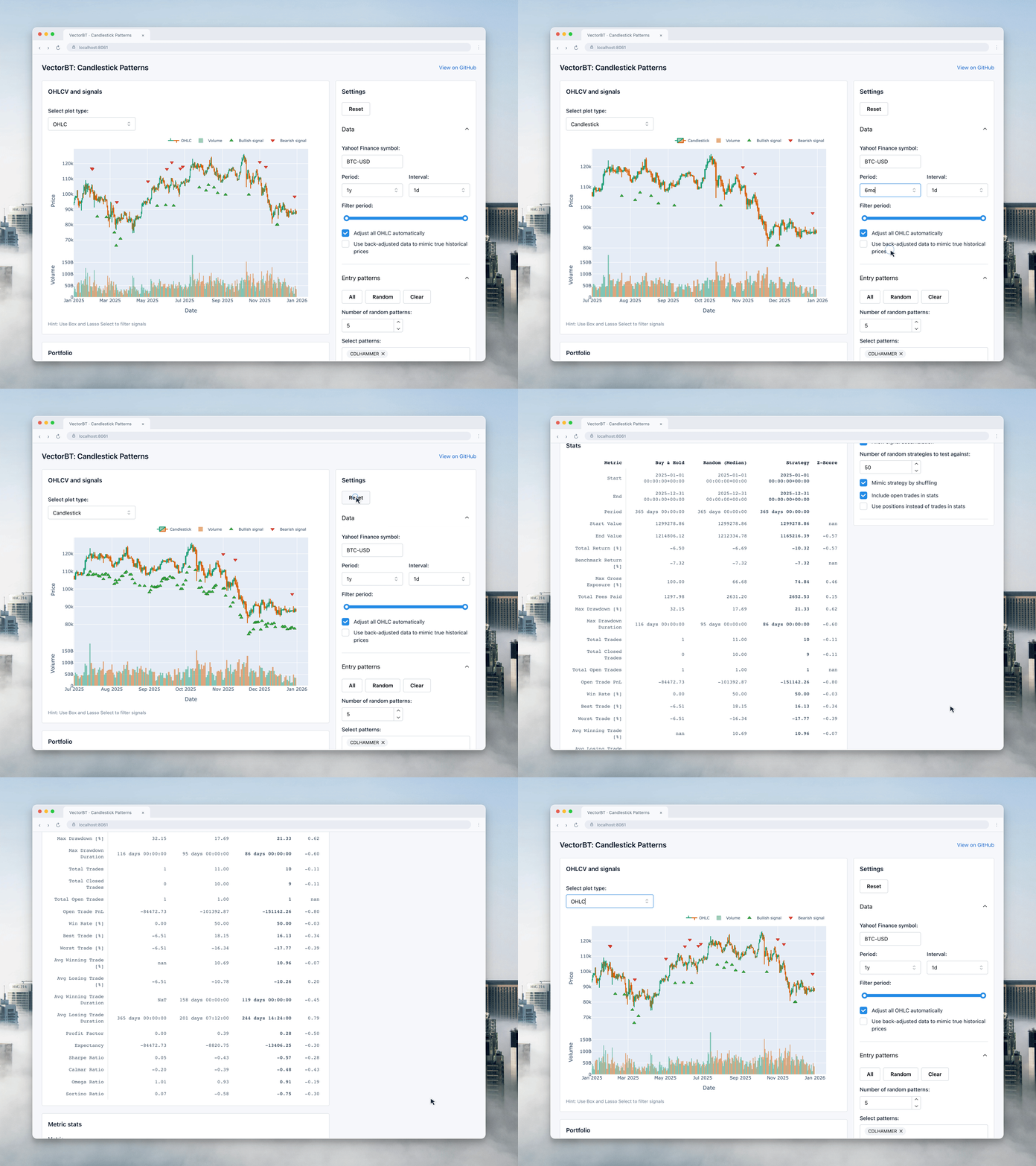
Candlestick Patterns
Explore candlestick patterns interactively and backtest their signals with VectorBT.
Learn more
The Features page includes worked examples for each part of a research workflow:
- Pandas accessors and broadcasting for labeled arrays.
- The Rust engine and vectorized backtesting for execution.
- Indicators and signals for expressing a strategy.
- Portfolio analysis and robustness testing for examining results.
- Data access and automation for maintaining inputs.
- Interactive visualization and composable Python workflows for exploring and reusing the results.
See Resources for community examples and learning material. VectorBT vs PRO compares the editions. Browse the VectorBT PRO tutorials.